

Posting video native vs. embedded
Video from your listing can be shared on Twitter two ways.
The first way we refer to as "native". This takes a few more steps and has a length limitation. However, the benefit is that your video will autoplay as your tweet is viewed.
The second we refer to as "embedding". Here we've done the work for you. We build Twitter Cards right into your Single Property Website so all you need to do is share the link to it. Twitter will automatically display the embedded video with your tweet.
Native
- Login to your Twitter account, at: twitter.com
- Click the "Tweet" button.
- Click the "Add photos or video" icon.
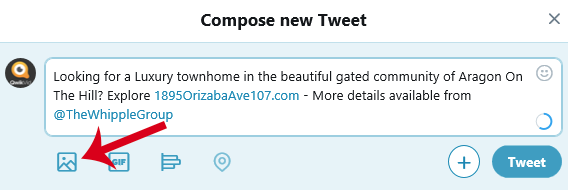
- Upload the video you previously downloaded from your Qwikvid listing.
Embedded
- Type your Tweet as you normally would, while figuring out a way to work the URL (ie. 123mianst.com) into the message. Adding the URL to the message, allows Twitter to automatically link to the video included on your Qwikvid Single Property Website.