Real Estate Marketing Ideas & Help

Refresh a Facebook Listing Link Preview

1 min read Facebook
To get started with Facebook Sharing Debugger, go to: developers.facebook.com.

How do I re-scrape my Real Estate listing

You can use the Sharing Debugger to see the information that is used when your website content is shared on Facebook, Messenger and other places.

  1. Go to: developers.facebook.com/tools/debug/
  2. Enter the URL you wish to re-scrape. Then press the "Debug" button.
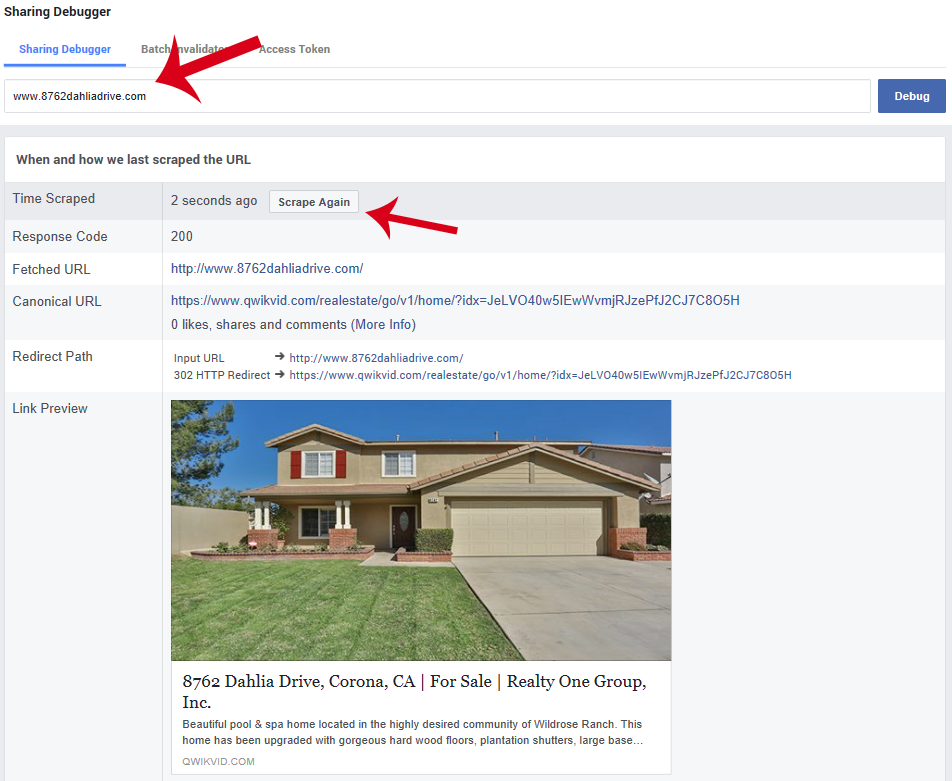
    re-scrape single property website for facebook
  3. Finally, press the "scrape again" button.
  4. All "NEW" posts on Facebook will use the latest scrape. NOTE: re-scraping does not update previous postings.

Still need help?

Email support with your order number, account email, and a short description of what happened. Include any error message so we can help quickly.

Was this article helpful?

More in Real Estate Marketing Ideas & Help